
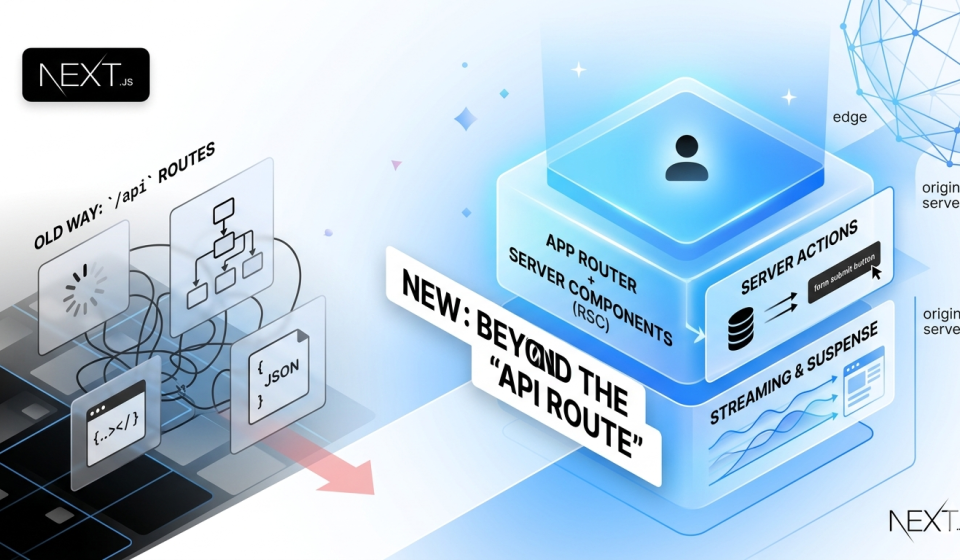

Why We’re Finally Getting Over Our “API Route” Fixation in Next.js
To be honest: for a long time, making a “modern” web app felt like working in an assembly line. You had to create a front-end component, realize it needed data, create a separate API route, write a fetch request, handle the loading state, handle the error state, and then do it all again for the next feature. It took a lot of “plumbing” to make a simple form work.
The Next.js community has changed a lot since 2026. We don’t worry about how to connect the front-end to the back-end anymore because the App Router and Server Components have made those lines less clear in the best way possible.
1. Goodbye, Loading Spinner Hell
We’ve all been there: you go to a site and see a white screen and a bouncing gray circle while the browser “thinks.” Before, this happened because the browser had to download a huge amount of JavaScript before it could even figure out what data to look for.
We now use React Server Components (RSC). The change is small but huge. The server gets the data while it’s putting the page together, so your browser doesn’t have to do all the work. The data is already there when the site loads on your screen. It feels like it happens right away because it does. Finally, the web is starting to feel like a group of pages instead of a bunch of loading bars.
2. The Magic of Server Actions
If you asked a developer a few years ago how to submit a contact form, they’d give you a blueprint for a small bridge: a client-side state, an API endpoint, and a fetch call.
Now? We just use Server Actions. It feels a bit like magic the first time you use them. You write a function that talks directly to your database, and you drop that function straight into your form. No separate API files to manage, no JSON serialization headaches, and no messy state management.
What I love most about this isn’t just that it’s faster to write—it’s more resilient. If a user is on a spotty 5G connection and their browser is struggling, a Server Action is much more likely to actually complete the task than a complex client-side fetch.
3. Making Pages Load Quickly (Streaming)
Not all data is the same. Some things load in milliseconds, while others, like an AI-generated summary or a deep-dive analytics report, take a little longer. Back then, one slow request would stop the whole page from loading.
We know how to stream by 2026. We send the “shell” of the page right away, which includes the headers, layout, and buttons, so the user can start using it right away. The heavy parts of the page “stream” in as soon as they are ready. It’s about how fast it seems. People don’t mind waiting an extra second for the heavy stuff if they can see that things are getting better.
4. The 2026 Performance Mindset
We’ve reached a point where “fast enough” isn’t the goal anymore—”instant” is. To get there, the tools have become much smarter. We’re seeing:
- Smart Images: No more worrying about resizing; the framework just serves the most efficient version for the device.
- Partial Prerendering: This is the holy grail. It lets us keep the static parts of a site (like a blog post) cached globally, while the dynamic parts (like a user’s profile picture) are injected instantly.
The Bottom Line: Less is More
The biggest lesson we’ve learned leading into 2026 is that the best JavaScript is the JavaScript you don’t have to send to the user. By moving the “brain” of our apps back to the server, we’re building sites that are lighter, more secure, and—crucially—much easier for us to maintain.
If you haven’t fully committed to the App Router yet, I get it—change is annoying. But once you stop writing boilerplate API routes and start writing direct logic, you’ll never want to go back.
I’m curious—have you made the jump to a “server-first” mindset yet, or are you still finding it hard to let go of the traditional API-to-Client workflow?